

Logical functions serve us to test conditions not only in Excel. They can be used in situation when we need to compare 2 or more values and find out if a certain condition is met. Often used function IF belongs to logical functions, except for this function, you will most often use functions AND and OR on which we will focus now.
How to do AND, OR in Excel – Functions AND and OR
Returns value TRUE or FALSE depending on the fulfillment of the conditions.
=AND( <logical value 1>; <logical value 2>, … )
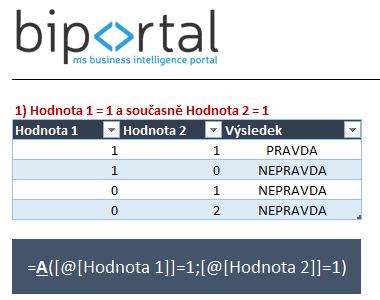
Result: We enter conditions of equality and inequality and if are the conditions inside the function fulfilled, the function returns the value TRUE.
More complex conditions – AND, OR functions usage in one formula
Both functions can be combined. Let’s say we need to find all records where:
- Value 1 = 1 AND
- Value 2 = 0 or value 2 = 1
In other words, Value 1 must always be 1 and value 2 can be 1 or 0.
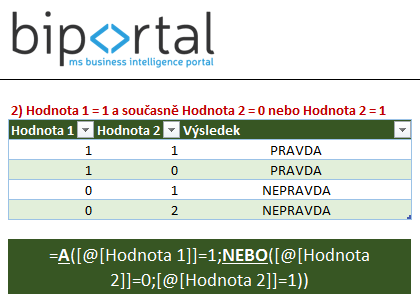
Entry is not complicated. The formula is similar to the one from the first example. Only difference is that second argument of A function is not a simple requirement but another OR function.