

In several previous articles, I discussed how to configure ADLS Gen2 for storing source .parquet data and also how to connect ADLS Gen2 directly to the Fabric Lakehouse using a shortcut. To recap – in the Fabric environment, we have a prepared Bronze Lakehouse, and within this lakehouse, we have a connection to the parquet data. Now it is time to populate our Bronze layer – delta tables as the source for silver/gold mart tables, which we will later populate using dbt.
Delta tables are a core component of the Fabric Lakehouse because they provide transactional support and ensure data consistency (ACID). They allow updates, deletions, and tracking of data changes, minimizing the risk of inconsistent or lost data.

Initial Creation of Delta Tables and System Attributes
Creating a delta table could look like the example below. I recommend adding system information to the source data (ADLS Gen2) in addition to the original data (in black), so that each table has the following set of mandatory attributes:
- source_updated_at – date of the last change
- source_businesskey – business key (primary key from the source record) used to generate surrogate keys in dbt
- source_system – source system code, another attribute used for generating surrogate keys in dbt
- ingestion_date – acquisition date used for SCD 2 historization
- ingestion_year – delta partition
- ingestion_month – delta partition
- ingestion_day – delta partition
- ingestion_filename – .parquet name
- ingestion_filepath – .parquet filepath
These system attributes should be considered the minimum for information about the data’s system origin, which will greatly simplify further work with dbt transformations – we will not need to manually adjust silver dbt template scripts later because they will always reference system attributes of the source table, which will have consistent names.
CREATE OR REPLACE TABLE bt_aw_customer

USING DELTA

PARTITIONED BY (ingestion_year, ingestion_month, ingestion_day)

AS

SELECT

  CAST(CustomerID AS STRING)      AS CustomerID,

  CAST(NameStyle AS STRING)       AS NameStyle,

  CAST(Title AS STRING)           AS Title,

  CAST(FirstName AS STRING)       AS FirstName,

  CAST(MiddleName AS STRING)      AS MiddleName,

  CAST(LastName AS STRING)        AS LastName,

  CAST(Suffix AS STRING)          AS Suffix,

  CAST(CompanyName AS STRING)     AS CompanyName,

  CAST(SalesPerson AS STRING)     AS SalesPerson,

  CAST(EmailAddress AS STRING)    AS EmailAddress,

  CAST(Phone AS STRING)           AS Phone,

  CAST(PasswordHash AS STRING)    AS PasswordHash,

  CAST(PasswordSalt AS STRING)    AS PasswordSalt,

  CAST(rowguid AS STRING)         AS rowguid,

  CAST(ModifiedDate AS STRING)    AS ModifiedDate,

  CAST(ModifiedDate AS TIMESTAMP)         AS source_updated_at,

  CAST(CustomerID AS STRING)      AS source_businesskey,

  "AdventureWorks"                AS source_system,

  TO_TIMESTAMP(

  CONCAT(source.year, '-', source.month, '-', source.day),

  'yyyy-M-d'

  )                               AS ingestion_date,

  source.year                     AS ingestion_year,

  source.month                    AS ingestion_month,

  source.day                      AS ingestion_day

FROM parquet.`Files/data-lake/01_bronze/AdventureWorks/Customer` as source;
Creating a delta table is a one-time operation, which can be done manually or automated if you want to save the setup time (it does not take long).
Insert Script for Populating Delta Tables – via Fabric Pipelines
The SQL script will be used to insert new data appearing in ADLS Gen2 into the delta tables. To ensure this operation does not take too long, we need a filtering criterion on the storage side to avoid sending unnecessary records to the delta table. For this, our source delta table (see previous section) has ingestion date attributes, allowing us to quickly identify only the missing data.
For automating delta table population we will need:
- a notebook with a SQL merge script
- a pipeline that runs the notebook from point 1 (this pipeline will later be part of the parent orchestrator)
I already have such a notebook prepared, so let’s show it:
- Through the task flow navigation – prepare delta tables section, where the stored artifacts are displayed

- I open the pipeline 01_bronze_deltabt_address – here it only contains a primitive call to the notebook with the SQL script for demonstration

- Double-clicking the notebook opens the notebook code in the Spark SQL environment. This notebook will run within the orchestrator after the data acquisition.
- The WHERE clause shows that only new data is inserted
- and only data that has been modified in some way
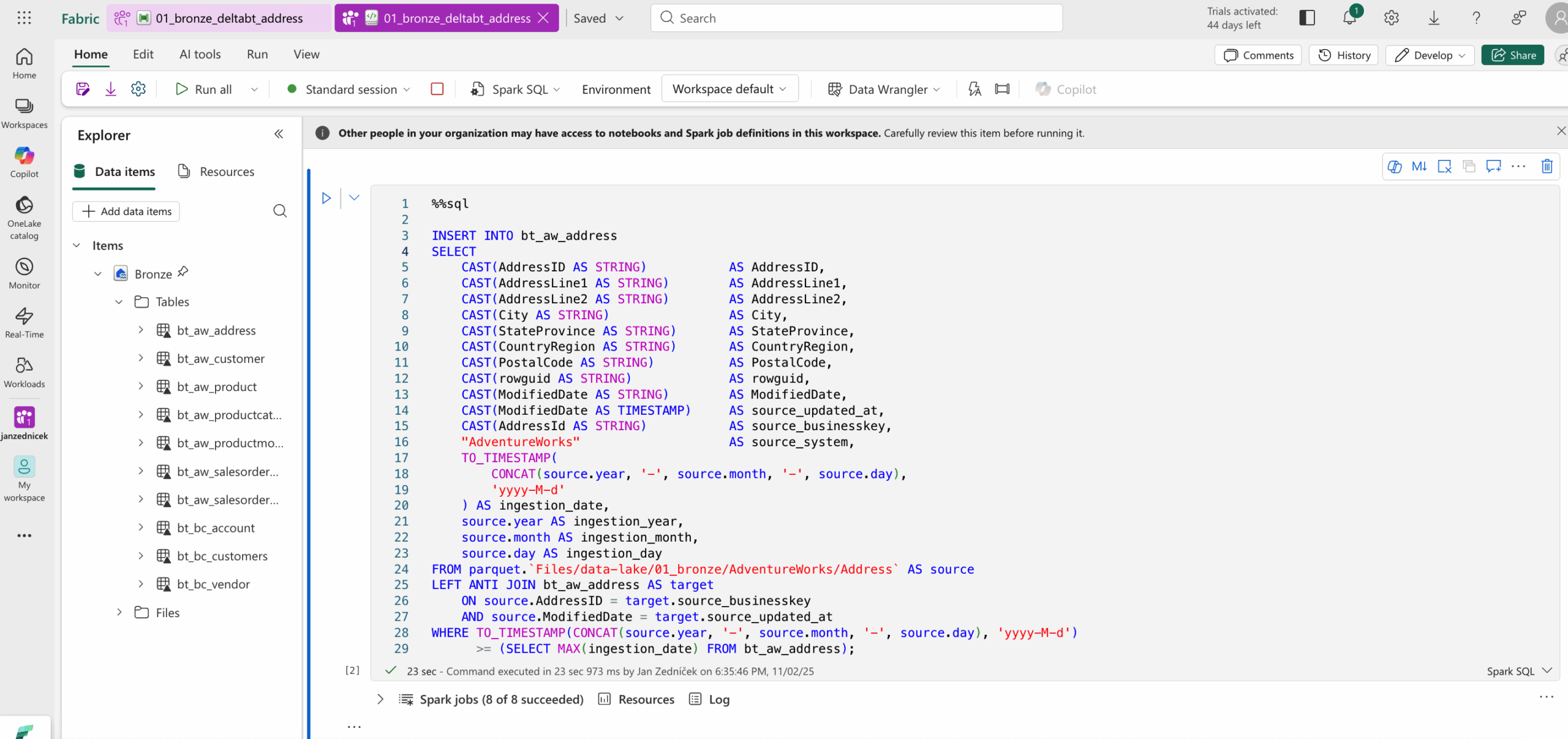
We can also use a simpler approach at the cost of more records in the delta table, by simply inserting new ingestion dates from the source and performing deduplication and filtering later in the silver layer.
INSERT INTO bt_aw_address

SELECT

CAST(AddressID AS STRING)           AS AddressID,

CAST(AddressLine1 AS STRING)        AS AddressLine1,

CAST(AddressLine2 AS STRING)        AS AddressLine2,

CAST(City AS STRING)                AS City,

CAST(StateProvince AS STRING)       AS StateProvince,

CAST(CountryRegion AS STRING)       AS CountryRegion,

CAST(PostalCode AS STRING)          AS PostalCode,

CAST(rowguid AS STRING)             AS rowguid,

CAST(ModifiedDate AS STRING)        AS ModifiedDate,

CAST(ModifiedDate AS TIMESTAMP)     AS source_updated_at,

CAST(AddressId AS STRING)           AS source_businesskey,

"AdventureWorks"                    AS source_system,

TO_TIMESTAMP(

CONCAT(source.year, '-', source.month, '-', source.day),

'yyyy-M-d'

) AS ingestion_date,

source.year AS ingestion_year,

source.month AS ingestion_month,

source.day AS ingestion_day

FROM parquet.`Files/data-lake/01_bronze/AdventureWorks/Address` AS source

WHERE TO_TIMESTAMP(CONCAT(source.year, '-', source.month, '-', source.day), 'yyyy-M-d')

>= (SELECT MAX(ingestion_date) FROM bt_aw_address);
Conclusion and Testing Data Download and Delta Table Loading
The final step is to create a test pipeline that:
- Runs the Azure Data Factory pipeline, which acquires the data and stores the parquet files in ADLS Gen2
- Executes the notebook that inserts the downloaded data into the delta table using the script shown above
