

Function REALTED is very frequent and useful in DAX language. We can use it for example when we need to search table (A) for value from other table (B). And finding the according value is the exact task of this function.
Syntax is very simple:

How Come RELATED Function Needs Only 1 Parameter?
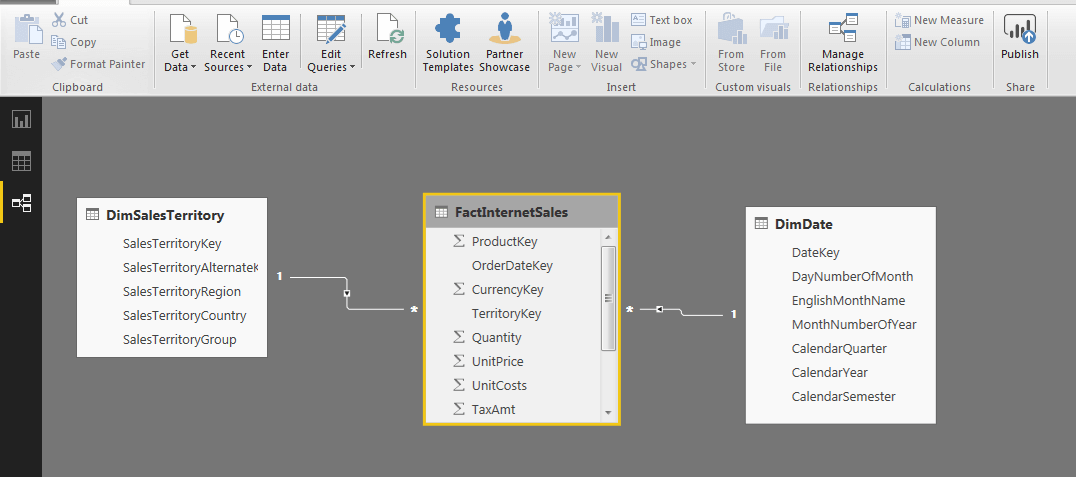
Data organization in Power BI consisting of tables connected in data model is the answer. And so because references exist between the tables, there is no need for the function to have multiple parameters. This is the difference compared to function VLOOKUP which needs 4 parameters.
When and How to Use Function RELATED in DAX?
The possibility to use the function is limited. We can use it only in case when we query into the table which returns only 1 value. In our case, we can only query from factual table FactInternetSales.
1) I create new column in this table and write a formula. You can see in the picture below how the function starts to automatically offer values from tables into which it sees.

2) I will let it add territory to every record on sales from table DimSalesTerritory using entry “RELATED(DimSalesTerritory[SalesTerritoryCountry])”
