

Microsoft Fabric is a unified data platform that connects various artifacts for developing data solutions, analytics, and BI in a single integrated environment. One of its key components is the Fabric Lakehouse, which combines the advantages of:
- Data Lake – scalability, low storage cost
- Data Warehouse – structured approach, SQL queries support
This article describes the process of creating a Fabric Lakehouse, its configuration, and subsequent integration with dbt.
Notice about the dbt-fabric adapter
The dbt adapter for Microsoft Fabric (dbt-fabric) is still in preview / early release and has certain limitations that should be considered during implementation:
Recommendation: for production scenarios, it is recommended to write transformed data to the Data Warehouse and use the Lakehouse as a source layer.
Due to the limitations of the dbt adapter, the Fabric Lakehouse will be our data source (Bronze), and the target will be the Fabric Data Warehouse artifact where we will have Silver and Gold layers. You can check the differences between Lakehouse and Data Warehouse in the article here. 1
Creating a Fabric Lakehouse and Data Warehouse
Requirements
- Active Microsoft Fabric workspace
- Contributor-level or higher permissions
- Data Engineering experience enabled
- Access to OneLake service
Creation procedure
- Open workspace – Go to the Microsoft Fabric Workspace where you want to create the Lakehouse.
- Create Lakehouse – New – Lakehouse. Fill in a name, e.g., “Bronze”, and confirm creation.
- Lakehouse structure
- /Files – storage for unstructured data (CSV, Parquet, JSON, etc.)
- /Tables – automatically managed Delta tables
- /SQL Endpoint – SQL interface for querying data
- Upload data – Data can be uploaded manually (drag & drop) or via Dataflow Gen2, Notebook, or Pipeline.
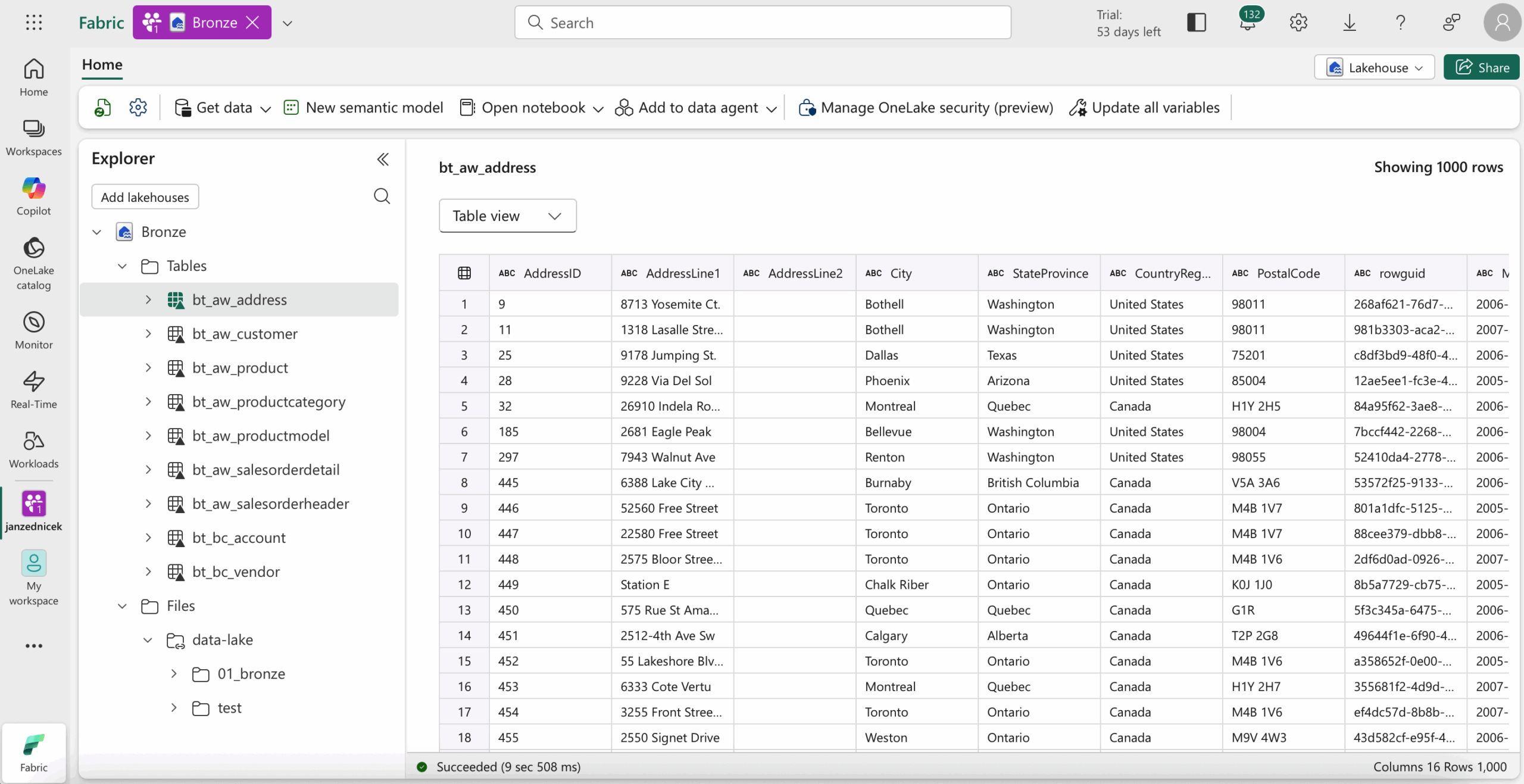
Similarly, we would create a Data Warehouse artifact named “DWH”.

Access and security configuration
- Permissions – User management is handled via Microsoft Purview / OneLake Security Model. Access should be managed at workspace and table level.
- Access via SQL Endpoint – Each Lakehouse has its own SQL endpoint. Connections can be made through Azure Data Studio, Power BI, or dbt adapter.
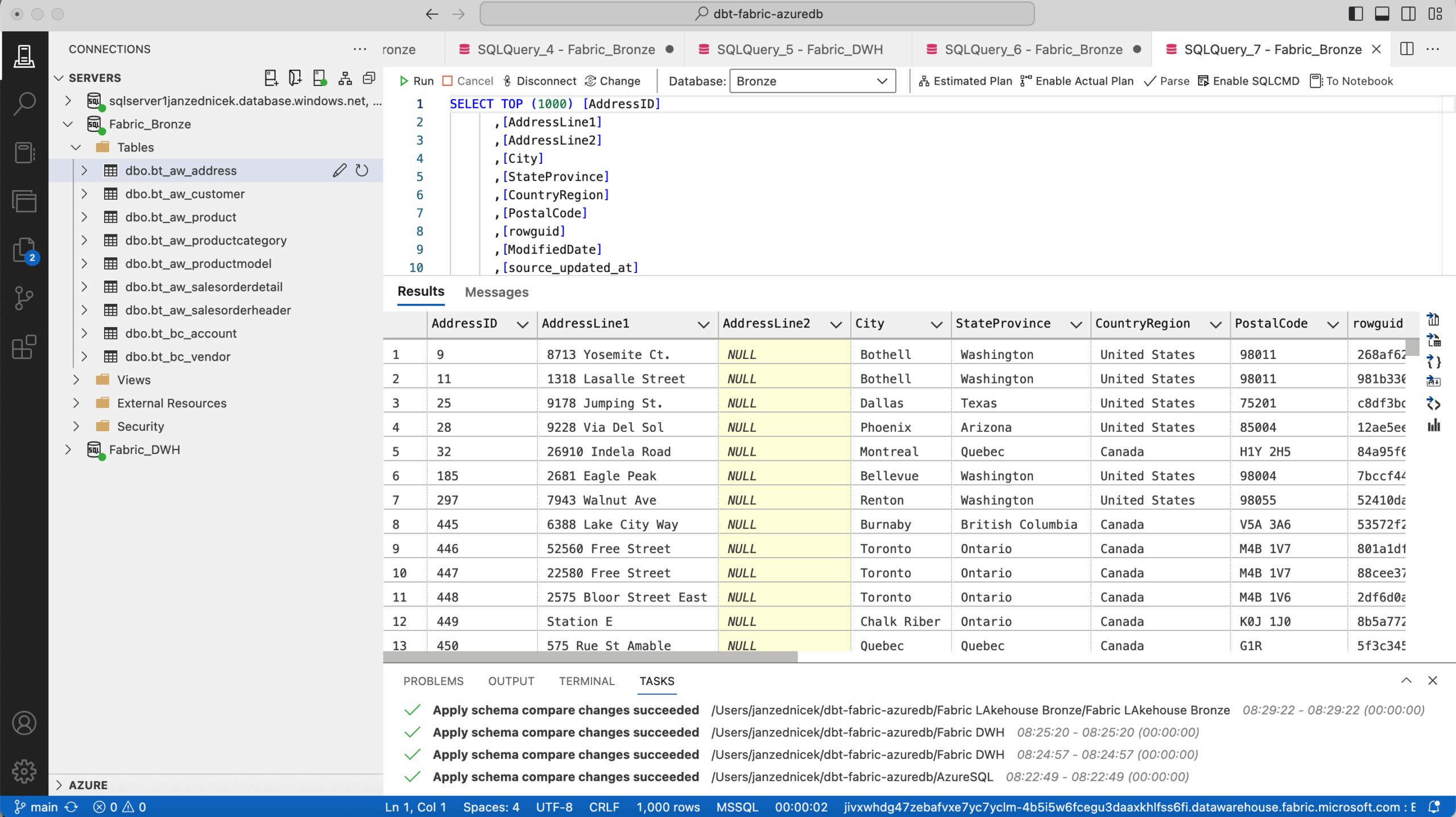
Integration with dbt
Requirements
- dbt-core >=1.7
- dbt adapter: dbt-fabric or dbt-synapse
- Credentials for Fabric SQL endpoint – ideally via service principal 2
Profiles.yml configuration
See the example below – more about the profiles.yml configuration in this article – Fabric | dbt – Configuration profiles.yml for SPN Authentization to SQL Endpoint
fabric_data_platform:
  target: prod
  outputs:
    prod:
      type: fabric
      driver: 'ODBC Driver 18 for SQL Server'
      server: ${DBT_FABRIC_SERVER}
      port: 1433
      database: 'DWH'
      method: spark
      schema: 02_silver
      authentication: ServicePrincipal
      tenant_id: ${DBT_FABRIC_TENANT_ID}
      client_id: ${DBT_FABRIC_CLIENT_ID}
      client_secret: ${DBT_FABRIC_CLIENT_SECRET}
      threads: 4
      timeout: 300
      retries: 1

    dev:
      type: fabric
      driver: 'ODBC Driver 18 for SQL Server'
      server: ${DBT_FABRIC_SERVER}
      port: 1433
      database: 'DWH_DEV'
      method: spark
      schema: 02_silver
      authentication: ServicePrincipal
      tenant_id: ${DBT_FABRIC_TENANT_ID}
      client_id: ${DBT_FABRIC_CLIENT_ID}
      client_secret: ${DBT_FABRIC_CLIENT_SECRET}
      threads: 4
      timeout: 300
      retries: 1
Project structure
The project structure is defined in dbt_project.yml. An example setup is provided in this article. Using a medallion architecture approach (Bronze, Silver, Gold layers), a test structure may look like this:
my_dbt_project/
|-- dbt_project.yml
|-- models/
|   |-- 02_silver/
|   |   |-- AdventureWorks/
|   |   |   |-- st_aw_salesorderdetail.sql
|   |   |-- Source2/
|   |-- 03_gold/
|   |   |-- AdventureWorks
|   |   |   |-- d_aw_address.sql
|   |   |   |-- d_aw_customer.sql
|   |   |   |-- d_aw_producthierarchy.sql
|   |   |   |-- d_date.sql
|   |   |   |-- f_aw_salesorderdetail
|   |   |-- BusinessCentral
|   |   |   |--d_finance_account
|-- analysis/
|-- macros/
|-- snapshots/
|   |-- 02_silver/
|   |   |-- AdventureWorks/
|   |   |   |-- st_aw_address.sql
|   |   |   |-- st_aw_customer.sql
|   |   |   |-- st_aw_product.sql
|   |   |   |-- st_aw_productcategory.sql
|   |   |   |-- st_aw_productmodel.sql
|   |   |   |-- st_aw_salesorderheader.sql
|   |   |-- BusinessCentral/
|   |   |   |-- st_bc_account.sql
|-- tests/
This dbt project is prepared for preparing source data into the Bronze layer of the Lakehouse, and then using it for Silver and Gold layers. First, historicalization is prepared, then model calculations.
Model example
Silver snapshot example
{% snapshot st_aw_address %}

{{
  config(
    target_schema='02_silver',
    strategy='check',
    check_cols='all',
    unique_key='source_businesskey',
    updated_at='ingestion_date',
    invalidate_hard_deletes=True,
    schema='02_silver',
    alias='st_aw_address'
  )
}}

WITH [ranked_source] AS (
    SELECT *,
           ROW_NUMBER() OVER (PARTITION BY [source_businesskey],[source_system] ORDER BY [ingestion_date] DESC,[source_updated_at] DESC) AS [dbt_row_num]
    FROM {{ source('bronze_data_source_fabricdatalake', 'bt_aw_address') }}

    /* DATA CLEANSING, FORMATTING, DEDUPLICATION */
)
SELECT *
FROM [ranked_source]
WHERE [dbt_row_num] = 1

{% endsnapshot %}
Gold dimension example
{{ config(
    materialized='incremental',
    unique_key='sk_aw_address',
    incremental_strategy='delete+insert',
    schema='03_gold',
    alias='d_aw_address'
) }}

WITH snapshot_table AS (
	SELECT
        {{ generate_custom_surrogate_key(['driving.source_businesskey', 'driving.source_system', 'driving.dbt_valid_from']) }} AS sk_aw_address,
        driving.source_system                                                   AS dbt_id_sourcesystem,
        driving.source_businesskey                                              AS dbt_id_business_key,
        CAST(
            CASE
                WHEN driving.dbt_valid_to IS NULL THEN 1
                ELSE 0
            END AS BIT)                                                 		AS dbt_current_flag,
        CAST(driving.dbt_valid_from AS DATE)                                    AS dbt_valid_from,
        CAST(COALESCE(driving.dbt_valid_to, '3000-12-31') AS DATE)              AS dbt_valid_to,
        CAST(driving.dbt_valid_from AS DATE)                                    AS mod_valid_from,
        CAST(CASE
                WHEN driving.dbt_valid_to IS NULL
                THEN '3000-12-31'
             ELSE DATEADD(DAY, -1, driving.dbt_valid_to)
        END AS DATE)                                                            AS mod_valid_to,
		CAST(driving.dbt_updated_at AS DATE)                                    AS dbt_updated_at,

        CAST(ModifiedDate AS DATE)                                              AS sk_modifieddate,
        City                                                                    AS city,
        AddressLine1                                                            AS address_line_1,
        AddressLine2                                                            AS address_line_2,
        StateProvince                                                           AS state_province,
        PostalCode                                                              AS postal_code,
        CountryRegion                                                           AS country_region
	FROM {{ ref('st_aw_address') }} driving
    WHERE 1=1
    {% if is_incremental() %}
        AND driving.dbt_updated_at > (
        SELECT MAX(dbt_updated_at)
        FROM {{ this }}
        )
    {% endif %}

    UNION ALL

	SELECT
        -1                                                                      AS skh_aw_address,
        'N/A'                                                                   AS dbt_id_sourcesystem,
        'N/A'                                                                   AS dbt_id_business_key,
        1                                                                       AS dbt_current_flag,
        CAST('1900-01-01' AS DATE)                                              AS dbt_valid_from,
        CAST('3000-12-31' AS DATE)                                              AS dbt_valid_to,
        CAST('1900-01-01' AS DATE)                                              AS mod_valid_from,
        CAST('3000-12-31' AS DATE)                                              AS mod_valid_to,
		CAST('1900-01-01' AS DATE)                                              AS dbt_updated_at,
        CAST('1900-01-01' AS DATE)                                              AS skh_modifieddate,
        'N/A'                                                                   AS city,
        'N/A'                                                                   AS address_line_1,
        'N/A'                                                                   AS address_line_2,
        'N/A'                                                                   AS state_province,
        'N/A'                                                                   AS postal_code,
        'N/A'                                                                   AS country_region
)
SELECT
        sk_aw_address,
        dbt_id_sourcesystem,
        dbt_id_business_key,
        dbt_current_flag,
        dbt_valid_from,
        dbt_valid_to,
        mod_valid_from,
        mod_valid_to,
        dbt_updated_at,
        sk_modifieddate,
        city,
        address_line_1,
        address_line_2,
        state_province,
        postal_code,
        country_region
FROM snapshot_table
WHERE 1=1
Running the models
- dbt snapshot
- dbt run
Monitoring and management
- dbt Cloud or Fabric Pipelines can be used for automated transformation runs.
- Data Lineage in Fabric allows visualizing relationships between sources, models, and Power BI reports.
- Delta tables provide support for versioning, time travel, and ACID transactions.
Conclusion
Integration of Fabric OneLake and dbt represents a robust, modern architecture for managing data transformations in a cloud environment.
- Unified OneLake data storage – combining Lakehouse and Data Warehouse capabilities
- Automated transformation management using dbt
- Transparent governance and lineage within the Fabric ecosystem
Reference
- Red Gate, Choosing Between the Lakehouse and Warehouse in Microsoft Fabric [online]. [cit. 2025-10-25]. Available from: https://www.red-gate.com/simple-talk/databases/sql-server/bi-sql-server/choosing-between-the-lakehouse-and-warehouse-in-microsoft-fabric/
- Microsoft documentation, Application and service principal objects in Microsoft Entra ID [online]. [cit. 2025-10-25]. Available from: https://learn.microsoft.com/en-us/entra/identity-platform/app-objects-and-service-principals?tabs=browser