

Internal Rate of Return (IRR – internal rate of return) is a widely used concept in finance. It is mainly used to evaluate the profitability of an investment that generates cash flows over time (which often have to be estimated). Every company or investor must decide whether it makes sense to commit an initial investment to a project and whether the funds are invested efficiently. In companies, these calculations are usually handled by a financial controlling specialist or an external consultant. We apply knowledge from finance, business economics and also the principles of financial mathematics.
Typically, an investor has a minimum required return (in %) below which they will not invest — often the risk-free rate plus some fixed premium. In companies, this required rate is commonly set using the WACC (Weighted Average Cost of Capital, in %). This serves as the minimum acceptable return on capital. If the IRR is higher than this threshold, the investment makes sense. Conversely, if IRR is lower, the investment is not attractive. Before we jump into the Excel example, let me explain IRR a bit.
Internal Rate of Return (IRR) – Definition and explanation
(i) Let’s repeat the formula for Net Present Value: 1

Where:
- n = project lifetime
- t = year index within the project life
- CFt = cash flow in year t
- i = discount rate
(ii) The Internal Rate of Return is the discount rate that makes the Net Present Value of the investment equal to 0. In other words:

(iii) The only unknown in that equation is the IRR (we estimate the cash flows and the project lifetime, possibly derived from depreciation groups).
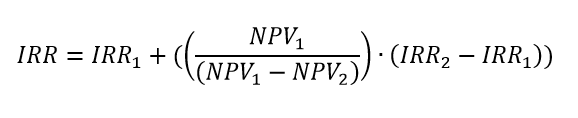
(iv) How to express IRR from the formula above if we were to calculate it manually? The most common method is linear interpolation, which proceeds as follows:
- Estimate an IRR1 and calculate NPV using the NPV formula. You must choose IRR1 so that NPV1 is negative. If not achieved on the first try, adjust and try again. Note IRR1 and NPV1.
- Estimate an IRR2 and calculate NPV. IRR2 must be chosen so that NPV2 is positive. If not achieved on the first try, adjust and try again. Note IRR2 and NPV2.
- Plug the values into the linear interpolation formula:
(v) Evaluate the resulting IRR against the required return (WACC).
Example of Internal Rate of Return in Excel
Problem statement: Management is considering a project. The project has a 5-year life and at the end it is expected to sell residual assets for CZK 50,000. The initial investment is CZK 500,000. In the first 2 years the project generates CZK 100,000 per year, and in the following 3 years CZK 120,000 per year. The company’s required return (WACC) is 8%. Determine the IRR and decide whether the investment is worthwhile.
Solution and conclusion: Investment is not acceptable from management’s perspective because the Internal Rate of Return is 6.43%, while the required return on capital is 8%. Therefore, we reject the investment even though the project generates CZK 110,000 on average in cash flows — after factoring in the investor’s required return and the time value of money, this return is insufficient.). Try to solve it in Excel by your own as a practise.
Tip: A fairly complex example of calculation the profitability of purchasing an apartment as an investment for rental purposes using IRR is discussed in the article – Calculate IRR for an Apartment and Internal Rate of Return (IRR) Calculation.
Reference
- Tipalti, Internal Rate of Return (IRR): See How Your Investment Performs [on-line]. [cit. 2025-10-30]. WWW: https://tipalti.com/resources/learn/internal-rate-of-return/