SQL Collation – How to Change Collation of Table Column

While installing SQL Server, one of the parameters that is needed to be set during installation is Server collation. It is a parameter influencing the way in which SQL stores non-Unicode data. We may choose SQL Collation CZECH_CI_AS in Czech environments. While starting a database, we can also select collation that can be different to Collation SQL Server instance.
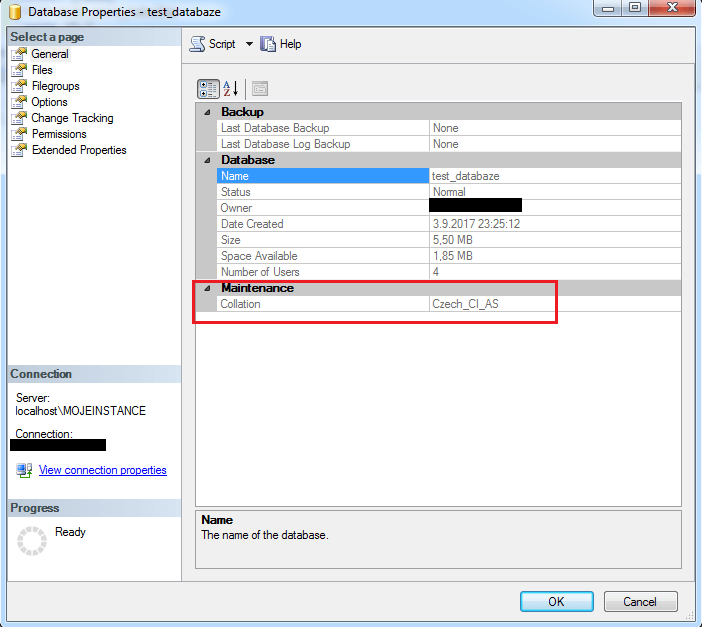
SQL Collation

It is different with setting up a table though. Collation is taken by default from the database, however it is possible to select different collation for columns of the table.

CREATE TABLE [dbo].[Table](
[Text_Czech] [varchar](8000) COLLATE Czech_CI_AS NULL,
[Text_Japanese] [varchar](8000) COLLATE Japanese_CI_AS NULL
) ON [PRIMARY]

5/5 - (1 vote)
Category: SQL Administration

About Ing. Jan Zedníček - Data Engineer & Controlling

My name is Jan Zednicek, and I have been working as a freelance Data Engineer for roughly 10 years. During this time, I have been publishing case studies and technical guides on this website, targeting professionals, students, and enthusiasts interested in Data Engineering particularly on Microsoft technologies as well as corporate finance and reporting solutions. 🔥 If you found this article helpful, please share it or mention me on your website or Community forum

Leave a Reply

Your email address will not be published. Required fields are marked *