

EXISTS is a T-SQL operator which can be used to test existence of a result in subquery. Based on that it can perform query or some task. Sql EXISTS performs so called “Existence test”.
SQL EXISTS Syntax
1) SQL Query WHERE
SELECT Columns
FROM dbo.Table
WHERE EXISTS
(SELECT columns
FROM Dbo.Table2
WHERE Condition);
Be aware that the operator performs only the existence test. If the records in subquery exist, it will perform main query without any limit. Result of the query will be every record of the table. This can be avoided by editing syntax. More in examples.
2) SQL Procedure
IF EXISTS (SELECT 1 FROM dbo.Table)
PRINT 'Record exists'
If some record is the result of the subquery, main query or sequence of steps will commence
SQL EXISTS Operator Examples
EXISTS does not perform result limitation but only existence test, as was mentioned. If we would like to test if there is non-zero number of records in subquery based on requirement and subsequently we would like to apply this requirement on the main query, we should approach this case like so:
Example – lets have 2 tables in the sports equipment store database:
- Table DimProduct – here is located the list of products (606 in total) which are sold by our company. Ever product belongs to some product category
- Table DimProductSubcategory – we can find there the list of product categories (37 categories in total)
The task is to use the operator to find all products belonging to category “helmets”. Empty table will be the result if this category does not exist.
Solution
SELECT [EnglishProductName] AS [Product_Name], [ListPrice] AS [Price_USD]
FROM [dbo].[DimProduct]
WHERE EXISTS
(SELECT 1
FROM [dbo].[DimProductSubcategory]
WHERE [ProductSubcategoryKey] = [dbo].[DimProduct].[ProductSubcategoryKey]
AND [EnglishProductSubcategoryName] = 'helmets')
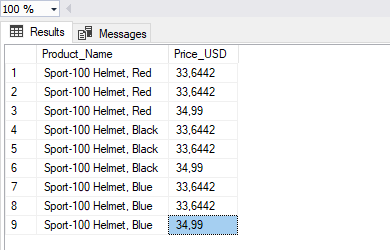
- Limitation of the main query to category “Helmets” is done in WHERE part by joining both tables. This actually creates INNER JOIN and applies limitation also to main query.
- “SELECT 1” is used for performance reasons
- Same effect would be achieved if we used SQL operator IN
It would be a mistake to write a query using SQL EXISTS like this:
SELECT [EnglishProductName] AS [Product_Name], [ListPrice] AS [Price_USD]
FROM [dbo].[DimProduct]
WHERE EXISTS
(SELECT 1
FROM [dbo].[DimProductSubcategory]
WHERE [EnglishProductSubcategoryName] = 'helmets')
Result would be all records of the table dbo.Dim Product