

As part of our series on financial mathematics, we will now build on the Compounding Factor. To recap – the compounding factor allows us to calculate the future value of our investment given an interest rate and the number of periods. A typical use case is when we want to know how much our term deposit will be worth at maturity if we invest a certain amount today. The discount factor (present value factor) does the same thing, but in reverse. In this case, we know the balance after n periods of compounding and want to find out how much we had to invest at the beginning to achieve that amount.
In everyday life, this may not seem too relevant — people are usually more interested in how much they will save by making regular deposits (the saver’s problem) or how much a bank will appreciate a one-time investment (the compounding factor). However, calculating the initial deposit (using the discount factor) can be useful and is particularly important in financial modeling and analysis scenarios.
Now that we’ve explained the difference, we can understand the formula and the relationship between the discount factor and the compounding factor.
The Difference Between the Discount Factor and the Compounding Factor
Compounding Factor (Future Value)
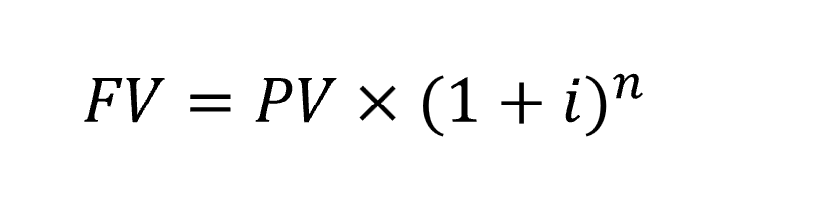
where:
- FV = balance at the end of the period (after n periods)
- PV = initial principal at the beginning of the period
- i = interest rate
- n = number of periods
- (1 + i)n is the Compounding Factor
From the formula (see Compounding Factor and Compound Interest), it follows that the future value (FV) of our investment after n periods equals the amount we deposit today multiplied by the Compounding Factor.
Discount Factor (Present Value)
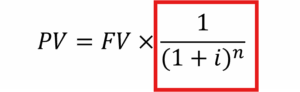
where:
- Kn = balance at the end of the period (after n periods)
- K0 = initial principal at the beginning of the period
- i = interest rate
- n = number of periods
- (1 + i)-n is the Discount Factor
The formula “says” that the amount invested at the beginning equals the current balance multiplied by the Discount Factor.
Using the
- Compounding Factor we calculate the Future Value (FV)
- Discount Factor we calculate the Present Value (PV)
Discount Factor Example in Excel
For comparison, let’s use the same data as in the compounding example. Previously, we asked: “What will be the balance on our term deposit after 5 years if we invest 100,000 USD at an interest rate of 2%?”
We calculated the future value = 110,408.1 USD. If we now apply the discount factor with the same interest rate and number of periods, we should get back to the initial deposit = 100,000 USD.
Example task: We have an investment that has been compounded annually at 2% for 5 years, resulting in a balance of 110,408.1 USD. What was the initial investment?
Solution:

As we can see, the math checks out. We’ve confirmed that the Discount Factor is indeed the reverse of the Compounding Factor.
Alternatively, you can use Excel’s built-in function for Present Value:
=PV(2%;5;;110408) — which gives you the same result.
» Download the Excel file with the Discount Factor example