

Microsoft Fabric 1 represents a unified SaaS platform that integrates components of the so-called modern data warehouse. Within a single platform, it is possible to handle storage through artifacts (Lakehouse/DWH), computing resources (Spark/Polaris), and tools for data flow orchestration. The Fabric architecture also provides tools for the transformation layer (e.g., Spark), which can be written and then orchestrated directly within Fabric itself.
Sometimes, however, we don’t want to get locked into a vendor-specific tool and prefer a modular solution. Critical parts such as transformations and source data should be kept externally (ADLS, dbt) to allow easier migration elsewhere (for example, if pricing becomes an issue). In this sense, dbt offers a number of advantages (not only because it’s open source), and within my series of articles about Fabric, I’ve chosen this tool specifically for the silver and gold medallions. Therefore, I’ll explain it a bit more in detail.
The Role of dbt in Fabric
dbt (Data Build Tool) serves as the transformation core in the ELT model (Extract, Load, Transform). Instead of moving data (which is the job of Data Factory), dbt focuses exclusively on the T – Transform part. dbt applies data engineering principles—versioning, modularization, and testing. This ensures the robustness of the entire transformation process and its easy maintenance.
In my project, we use dbt to manage data flow through the Medallion Architecture (Bronze, Silver, Gold). Bronze in Fabric is represented as a Lakehouse with shortcuts to Azure Data Lake Storage Gen 2 2 parquet files, followed by materialization into Delta tables. These Delta tables in the Lakehouse serve as our data source, and dbt then takes over for the logic and computation of the silver and gold layers.
I’ve previously written about dbt in the dbt category – there’s a basic introduction on how to set it up, configure connections, and more.
Medallion Architecture: Logical Data Separation
The Medallion pattern is a recommended design standard for Lakehouse systems. It ensures atomicity, consistency, isolation, and durability (ACID) of data at all levels—these are the fundamental prerequisites for a functional data solution. Each layer has a clearly defined responsibility and minimum data quality requirements.
Small note: these are just new words for something that has existed for a long time – for experienced data engineers, it’s nothing more than fancy buzzwords for a) Landing (Bronze), b) Staging (Silver), c) Semantic model/Data mart (Gold).
dbt as the Transformation Engine in Fabric
For efficient execution of dbt transformation models, it’s essential to understand the interaction between dbt and the Fabric compute environment.
Connectivity, Performance, and Security (SQL Endpoint)
- dbt Adapter: To connect to Fabric, the dbt-fabric adapter (derived from dbt-spark) is used. dbt doesn’t connect directly to a Spark cluster but instead uses the Lakehouse SQL Endpoint to send SQL queries.
- Polaris Engine: SQL queries generated by dbt are processed by the Polaris engine (a high-performance engine under Fabric). This architecture allows dbt to execute robust operations such as CREATE TABLE AS SELECT or complex SQL statements optimized for the Delta format.
- SPN Authentication: As we’ll see in later parts, our production environment requires authentication using a Service Principal (SPN) instead of a username and password. This is critical for CI/CD pipelines and security. It will be configured in the dbt configuration files.
Modularization and DAG (Directed Acyclic Graph)
The core methodology and biggest strength of dbt is the modularization of transformations. Each transformation step within the Medallion Architecture is an individual SQL file (model).
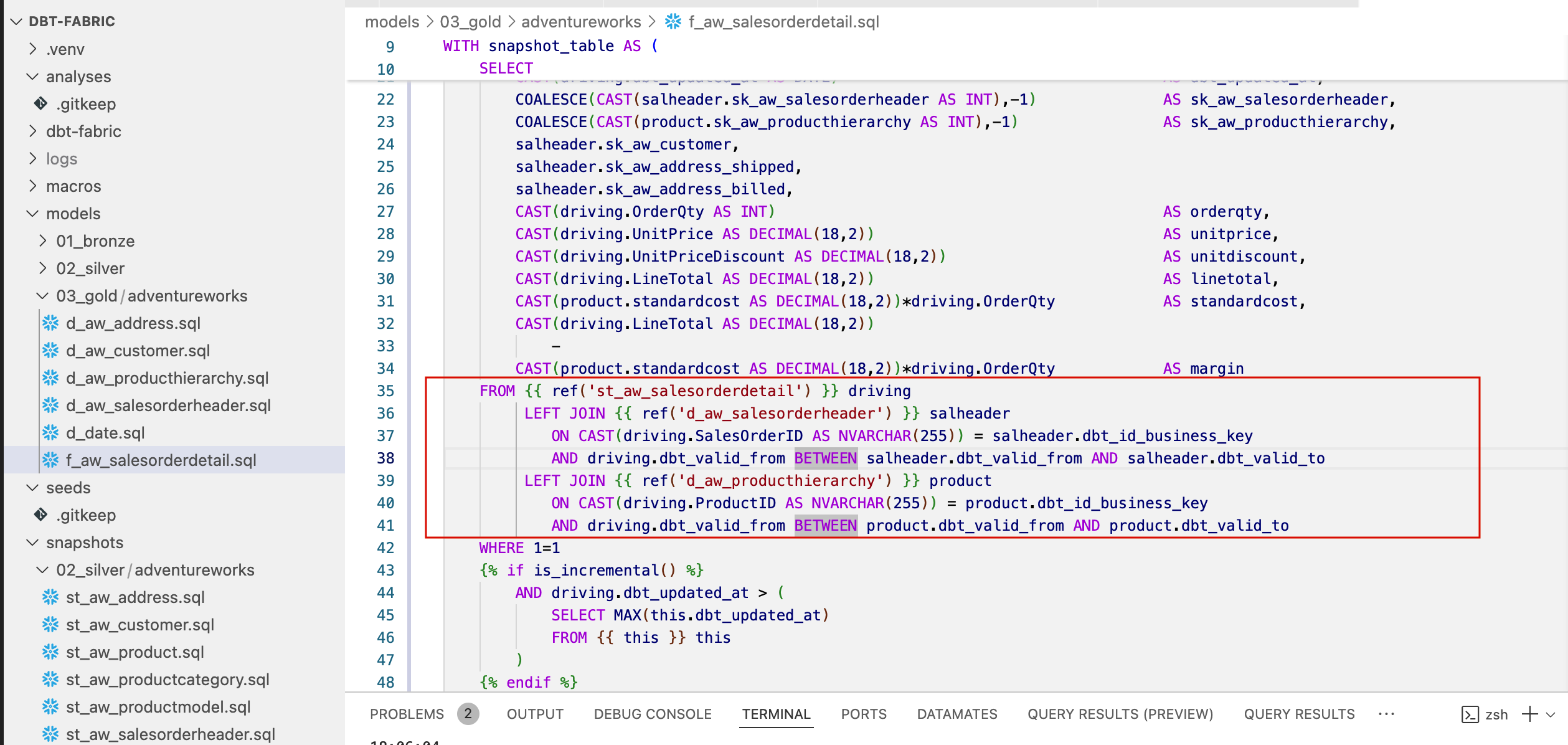
- Dependencies: Dependencies between models (e.g., a Silver model depending on a Bronze model, or interdependencies within Gold tables) are defined using the JINJA macro {{ ref(‘model_name’) }} as shown in the image below.
- Building the DAG: dbt automatically analyzes these references and builds a DAG – a directed acyclic graph. When executed (dbt run), dbt ensures that models are run in the correct topological order. This removes the need to write complex data flow logic as in traditional ETL tools. This way, we can run the entire model and all dependencies with a single terminal command, and dependencies resolve automatically. We just need to monitor the number of cores allowed for dbt to use for parallelization on the target compute engine—configured in the settings.
Managing Incrementality and History Tracking
One of the biggest technical benefits of dbt in Fabric OneLake is its efficient handling of data changes:
- Incremental Models: In the Silver and Gold layers, dbt allows defining models as materialized=’incremental’. Here dbt uses the logic of the is_incremental() macro to limit reads from the source to only new or changed data. This drastically reduces compute time and Fabric Capacity (CU) consumption.
- History Tracking (SCD Type 2): To track changes in key dimensions (e.g., customer, product), dbt uses the concept of Snapshots. The Snapshot functionality generates tables that record a validity interval (dbt_valid_from and dbt_valid_to) for each record, which forms the core of the SCD Type 2 implementation for dimension tables. For large fact tables, we’ll use a different approach, since the snapshot method copies entire source Delta tables, which we want to avoid.
Conclusion
The Medallion Architecture combined with the dbt methodology provides a robust foundation for our project working with the sample data AdventureWorks. By using Fabric as a powerful compute and storage backend and dbt as an agile transformation frontend tool, we ensure that our data is reliable, testable, and ready for business reporting.
Reference
- Microsoft documentation, Microsoft Fabric [online]. [cited 2025-10-21]. Available from WWW: https://www.microsoft.com/en-us/microsoft-fabric
- Microsoft documentation, Azure Data Lake Storage Gen2 [online]. [cited 2025-10-21]. Available from WWW: https://learn.microsoft.com/cs-cz/power-query/connectors/data-lake-storage